
- Seção
FC 15109 :: Como simplificar o checkout?
Altere a maneira como são apresentados os campos do checkout, para facilitar o preenchimento e aumentar as vendas.
Chamamos esta melhoria de tiny checkout.
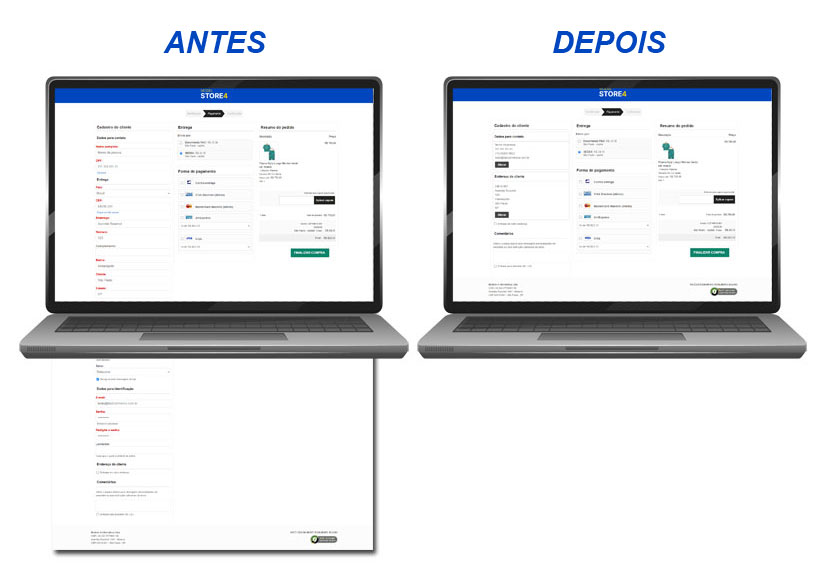
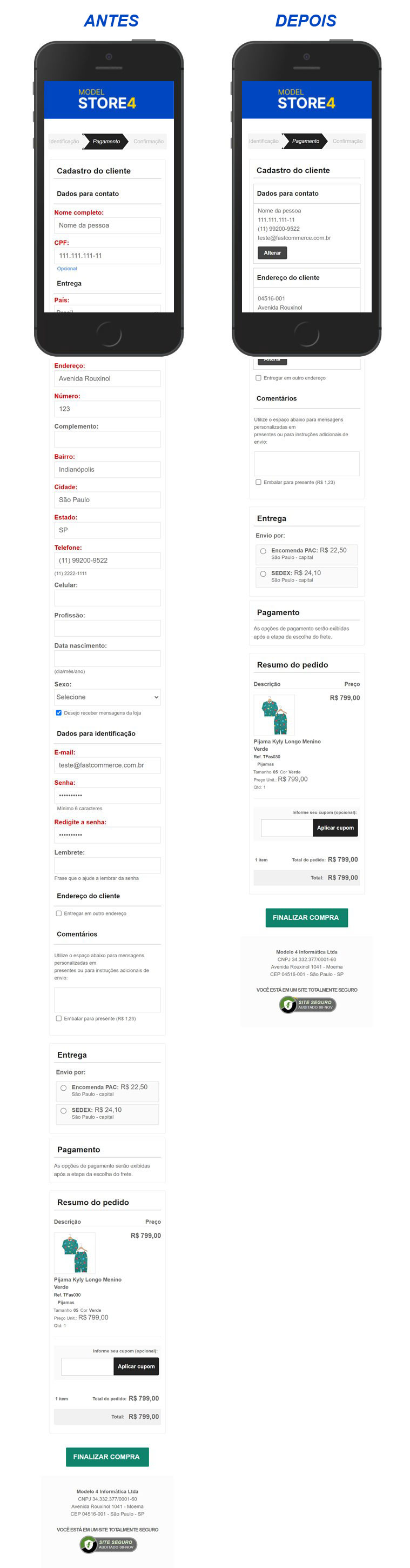
Ao implantar o tiny checkout na sua loja, os dados cadastrais do cliente e da entrega serão apresentados de maneira resumida. Para alterá-los, basta ao cliente clicar no botão Alterar.
Veja lado a lado como fica o checkout ante e depois de implantar o tiny checkout.
No computador:
No celular:
Passos para implantar o tiny checkout:
ATENÇÃO: Antes de implantar, faça backup dos arquivos JS/resource-00.js, JS/config.js, CSS/checkout e checkout.htm.
1º Passo
Localize a função function FuncChkRegisterEnd() no arquivo checkout.htm e substitua pelo código abaixo:
function FuncChkRegisterEnd(){
if(F$.Step==2){
window.onscroll=null;
document.getElementById('idChkTagsCol2FC').style.position='relative';
document.getElementById('idChkExtCartFC').style.position='relative';
document.getElementById('idTitCartFC').classList.add("remove-step-four");
if(sF$.fnGetConfig("Use_Dynamic_Cart"))localStorage.setItem("dynCart","");
/* No Tiny Checkout, remove fixed da primeira coluna no passo final */
function removeFixedDivStep2(){
var idChkExtRegisterFC=document.getElementById("idChkExtRegisterFC");
if(idChkExtRegisterFC&&idChkExtRegisterFC.style.position=="fixed")idChkExtRegisterFC.style.position="relative";
}
if(oStoreConfig$.Show_TinyCheckout[0])removeFixedDivStep2();
/* FIM - No Tiny Checkout, remove fixed da primeira coluna no passo final */
}
else if(F$.Step==1){
if(bShowCupomCheckout)fnShowCupom();
setTimeout(function(){SaveCart$.fnShowSaveCart();},800);
fnInsertMask();
fnShowBadgeCartCheckout();
/*-----Tiny Checkout-----*/
FCLib$.fnLoadScript(FC$.PathHtm+'js/tinycheckout.js',true);
/*-----FIM Tiny Checkout-----*/
}
fnShowStep(F$.Step);
}
2º Passo
Clique aqui para baixar o arquivo tinycheckout.js e em seguida envie para a pasta htm/js
3º Passo
Acesse a pasta htm/js e adicione o código abaixo no fim do arquivo resource-00.js
/*Tiny Checkout*/
"tiny-checkout-box-message-previous-item":"Por favor, preencha os campos do item anterior para prosseguir.",
"tiny-checkout-delivery-address":"Endereço de entrega",
"tiny-checkout-save-button":"Salvar",
"tiny-checkout-edit-button":"Alterar",
"tiny-checkout-alert-fill-fields":"Por favor, preencha todos os campos corretamente"
Ainda no arquivo resource-00.js localize a linha abaixo:"register-checkout-shipping-information":"Dados para entrega",
e altere para"register-checkout-shipping-information":"Endereço do cliente",
4º Passo
Acesse a pasta htm/js e adicione o código abaixo no fim do arquivo config.js
 "Show_idCountryFC":[false,"Exibe o campo idCountryFC 'País' no checkout"],
"Show_idBirthdayFC":[false,"Exibe o campo idBirthdayFC 'Data nascimento' no checkout"],
"Show_idPassRemFC":[false,"Exibe o campo idPassRemFC 'Lembrete de senha' no checkout"],
"Show_idCellPhoneFC":[false,"Exibe o campo idCellPhoneFC 'Celular' no checkout"],
"Show_idGenderFC":[false,"Exibe o campo idGenderFC 'Sexo' no checkout"],
"Show_idAccInfoFC":[false,"Exibe título idAccInfoFC 'Dados para identificação' no checkout"],
"Show_idTxtCEP1FC":[false,"Exibe idTxtCEP1FC 'Clique se não souber CEP' no checkout"],
"Show_idLocalFC":[true,"Exibe o campo idLocalFC 'Local' em outro endereço de entrega do checkout"],
"Show_idParaFC":[false,"Exibe o campo idParaFC 'Para' em outro endereço de entrega do checkout"],
"Show_idPEmailFC":[false,"Exibe o campo idPEmailFC 'E-mail' em outro endereço de entrega do checkout"],
"Show_idPPaisFC":[false,"Exibe o campo idPPaisFC 'País' em outro endereço de entrega do checkout"],
"Show_idTxtCEP2FC":[false,"Exibe idTxtCEP2FC 'Clique se não souber CEP' em outro endereço de entrega do checkout"],
"Show_idTxtCPFFC":[false,"Para clientes B2C: Exibe texto idTxtCPFFC 'CPF opcional'"],
"Show_idOccupationFC":[false,"Para clientes B2C: Exibe o campo idOccupationFC 'Profissão' no checkout"],
"Show_idTxtCPFFC_PJ":[false,"Para clientes B2B: Exibe texto idTxtCPFFC 'CNPJ opcional'"],
"Show_idOccupationFC_PJ":[false,"Para clientes B2B: Exibe o campo idOccupationFC 'Ramo de Atuação' no checkout"],
"Show_idFAXFC_PJ":[false,"Para clientes B2B: Exibe o campo idFAXFC 'Fax' no checkout"],
"Show_TinyCheckout":[true,"Exibe checkout resumido após preenchimento"]
5º Passo
Acesse a pasta htm/css e adicione o código abaixo no fim do arquivo checkout.css
/*Tiny Checkout*/
#newContactDataDIV,#newAddressDataDIV,#newDeliveryDataDIV,#newContactPJDataDIV{border:1px solid lightgray;}
#newAddressDataDIV,#newDeliveryDataDIV{margin-top:10px}
#newAddressDataDIV div,#newDeliveryDataDIV div{overflow:hidden;}
#newContactDataDIVSub2 p,#newAddressDataDIVSub2 p,#newDeliveryDataDIVSub2 p,#newContactPJDataDIVSub2 p{font-size: 1.3em; margin: 9px 0;}
#newContactDataDIV tr,#newAddressDataDIV tr,#newDeliveryDataDIV tr,#newDeliveryDataDIV tbody,#newContactPJDataDIV tr {display: block;}
#newContactDataDIVSub1,#newContactDataDIVSub2,#newAddressDataDIVSub1,#newAddressDataDIVSub2,#newDeliveryDataDIVSub1,#newDeliveryDataDIVSub2,#newContactPJDataDIVSub1,#newContactPJDataDIVSub2 {margin: 10px;}
#newAddressDataDIVAlert,#newDeliveryDataDIVAlert{text-align: center;font-size: 1.5em;margin: 25px 5px;padding: 10px 0;}
.hideFieldsConfig{display:none!important;}
#idChkTabRegisterFC button{padding:8px 15px;background:#444;font-size:0.8rem;font-weight:700;color:#fff;border:none;outline:none;cursor:pointer;border-radius:3px;margin:5px 0 0 0;}
#idChkULPlacesFC td {font-size:1.3em;line-height:18px;font-family:unset;}
#newAddressDataDIV .EstTxtErrField,#newDeliveryDataDIV .EstTxtErrField{top:0;display:inline-block;}
|