
- Seção

FC 15048 :: Como divulgar seus produtos na Black Friday?
Conheça nossos modelos especiais de e-mail marketing para criar uma campanha matadora.
Não fique de fora da Black Friday, considerada umas das datas mais importantes para o e-commerce.
Crie uma campanha especial ou utilize um dos nossos modelos prontos para divulgar suas super promoções.
De uma forma bem simples e rápida, sua campanha será criada e enviada para toda sua base de clientes.
| Modelo 1 | Modelo 2 |
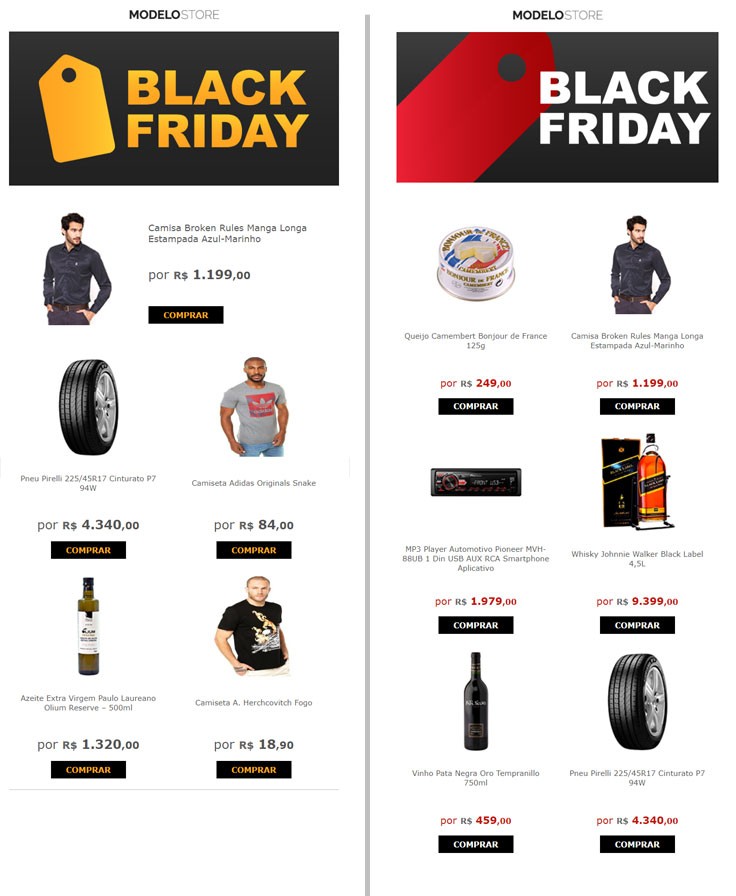
Modelo 1
Clique aqui para baixar o arquivo que deve ser enviado para a pasta htm
Clique aqui para baixar o arquivo que deve ser enviado para a pasta images
Copie o código abaixo e cole ao final do arquivo EstiloProdutoOut.htm
<p16>
<table border="0" height="370" width="300" cellpadding="8" cellspacing="1">
<tr>
<td height="200" valign="bottom" ><a href="<URLProd>"><img src="<ImagemProdPri>" style="margin-right:50px; margin-left:50px; margin-top:10px;width:200px;height:200px;border-radius:10px;"/></a></td>
</tr>
<tr style="height:80px">
<td><center><span style="color:#555"><a style="text-decoration:none; color:#555; font-family: inherit; font-size:15px;" href="<URLProd>"><NomeProd></a></span></center></td>
</tr>
<tr height="50px">
<td>
<center><a style="color:#555; text-decoration:none; font-family: inherit; font-size:12px;" href="<URLProd>"></a><br /><span style="color:#555;font-size:25px;"><Preco></span></center>
</td>
</tr>
<tr>
<td height="40" align="center"><table width="150" height="35" style="background-color:#000000;"><tr><td><center><a href="/prod,idproduto,<IDProduto>,<NomeProdUA>" style="font-size:16px;color:#ffa923;font-weight:bold;text-decoration:none">COMPRAR</a></center></td></tr></table></td>
</tr>
</table>
</p16>
<p17>
<table style="width:660px; margin-bottom:30px;">
<tr>
<td rowspan="3" width="280px"><a href="<URLProd>"><img style="width:90%;margin-left:5%;margin-right:5%" src="<ImagemProdPri>"/></a></td>
<td rowspan="2" width="380px" style="padding: 0px 20px 0px 20px">
<p style="margin-bottom:15px"><a style="color:#555; text-decoration:none; font-family: inherit; font-size:18px;" href="<URLProd>"><NomeProd></a><br></p>
<p><a style="color:#555; text-decoration:none; font-family: inherit; font-size:15px;" href="<URLProd>"><DescricaoCurta></a></p>
</td>
</tr>
<tr height="100px"></tr>
<tr height="100px">
<td style="padding: 0px 20px 0px 20px">
<p style="margin-bottom:15px"><span style="color:#555;font-size:25px;"><Preco></span></p><br>
<p style="margin-bottom:15px; padding: 0px 20px 0px 20px, padding-left:-20px;"><table width="150" height="35" style="background-color:#000000;"><tr><td><center><a href="/prod,idproduto,<IDProduto>,<NomeProdUA>" style="font-size:16px;color:#ffa923;font-weight:bold;text-decoration:none">COMPRAR</a></center></td></tr></table></p>
</td>
</tr>
</table>
</p17>
Modelo 2
Clique aqui para baixar o arquivo que deve ser enviado para a pasta htm
Clique aqui para baixar o arquivo que deve ser enviado para a pasta images
Copie o código abaixo e cole ao final do arquivo EstiloProdutoOut.htm
<p15>
<table border="0" height="370" width="300" cellpadding="8" cellspacing="1">
<tr>
<td height="200" valign="bottom" ><a href="<URLProd>"><img src="<ImagemProdPri>" style="margin-right:50px; margin-left:50px; margin-top:10px;width:200px;height:200px;border-radius:10px;"/></a></td>
</tr>
<tr style="height:80px">
<td><center><span style="color:#555"><a style="text-decoration:none; color:#555; font-family: inherit; font-size:15px;" href="<URLProd>"><NomeProd></a></span></center></td>
</tr>
<tr height="50px">
<td>
<center><a style="color:#c3150b; text-decoration:none; font-family:inherit; font-size:20px;" href="<URLProd>"></a><br /><span style="color:#c3150b;font-size:20px;"><Preco></span></center>
</td>
</tr>
<tr>
<td height="40" align="center"><table width="150" height="35" style="background-color:#000000;"><tr><td><center><a href="/prod,idproduto,<IDProduto>,<NomeProdUA>" style="font-size:16px;color:#ffffff;font-weight:bold;text-decoration:none">COMPRAR</a></center></td></tr></table></td>
</tr>
</table>
</p15>
Para terminar, siga os passos do artigo abaixo, que mostra como criar uma campanha utilizando o recurso de e-mail marketing do Fastcommerce:
Como criar uma campanha de e-mail marketing?
https://ajuda.fastcommerce.com.br/como-criar-uma-campanha-de-e-mail-marketing
|